
Please rotate your device
To continue exploring this website, please rotate your device to a vertical orientation

What is a sandbox and how do agents use it?
Agents need isolated environments, called sandboxes, to run code safely. Learn how agents use sandboxes to work in parallel, share files, and call APIs.
- Authors
 Chloe Florit
- Date
- November 11, 2026


Agents need an isolated place to run code so your systems and data stay safe. In this post, we’ll break down what agents need from a sandbox (isolation, saved progress, and speed), how agents run in parallel and share files, and how Blaxel’s Agent Proxy lets agents call external APIs without exposing credentials.
A sandbox is an isolated environment where code can only use the files, tools, and APIs you choose. Imagine you want a coding agent to fix a bug in your app. It would need to edit files, install dependencies, and run tests. Without a sandbox, the agent could read personal files or overwrite code you wanted to keep. In a sandbox, an agent that may make a mistake or follow a malicious instruction cannot harm your files and data.
As agents manage more of our codebases, work is often split across multiple agents. In this post, we’ll break down how agents work in parallel, share files, and call external APIs with Baseten Sandboxes and Blaxel’s Agent Drive and Agent Proxy.
What agents need from a sandbox
A good sandbox provides isolation, state, and speed.
Isolation
When you start a sandbox in the cloud, you get a slice of a server. A provider runs many sandboxes on one server, often from different customers. Agents may run untrusted code, so the sandbox must keep that code away from your data and from other people’s sandboxes. Sandboxes create this isolation with containers or microVMs. Containers share the server’s kernel*, so a vulnerability in the kernel could let code access anything on the server, including other sandboxes. MicroVMs each run their own small operating system with its own kernel, so a vulnerability stays inside that one sandbox. Baseten Sandboxes use microVMs.
*The kernel is the main part of the server’s operating system, usually Linux. It controls what a program can access (e.g. files, memory, network).
State
Agents often work on long tasks across many steps or sessions. A good sandbox keeps the agent’s files, memory, and running processes between steps, so the agent doesn’t lose its progress.
Speed
Agents may start many sandboxes during one task. If each one is slow to start, the delays add up.
Running agents in parallel
Fast startup matters most when agents work in parallel. Agents can split a larger task into smaller tasks and work on them at the same time. Depending on the task, they can work independently or share files across sandboxes. There are two ways to organize sandboxes for parallel work:
Disconnected: Each agent works in its own sandbox and returns its results to an orchestrator, which combines them. This works well when tasks can run independently.
Connected: Multiple sandboxes have access to shared files, so agents can pass information to each other while still working in their own sandbox.
Connected sandboxes can still return results to an orchestrator. The difference is that they also have a shared place to exchange files.
Running agent swarms
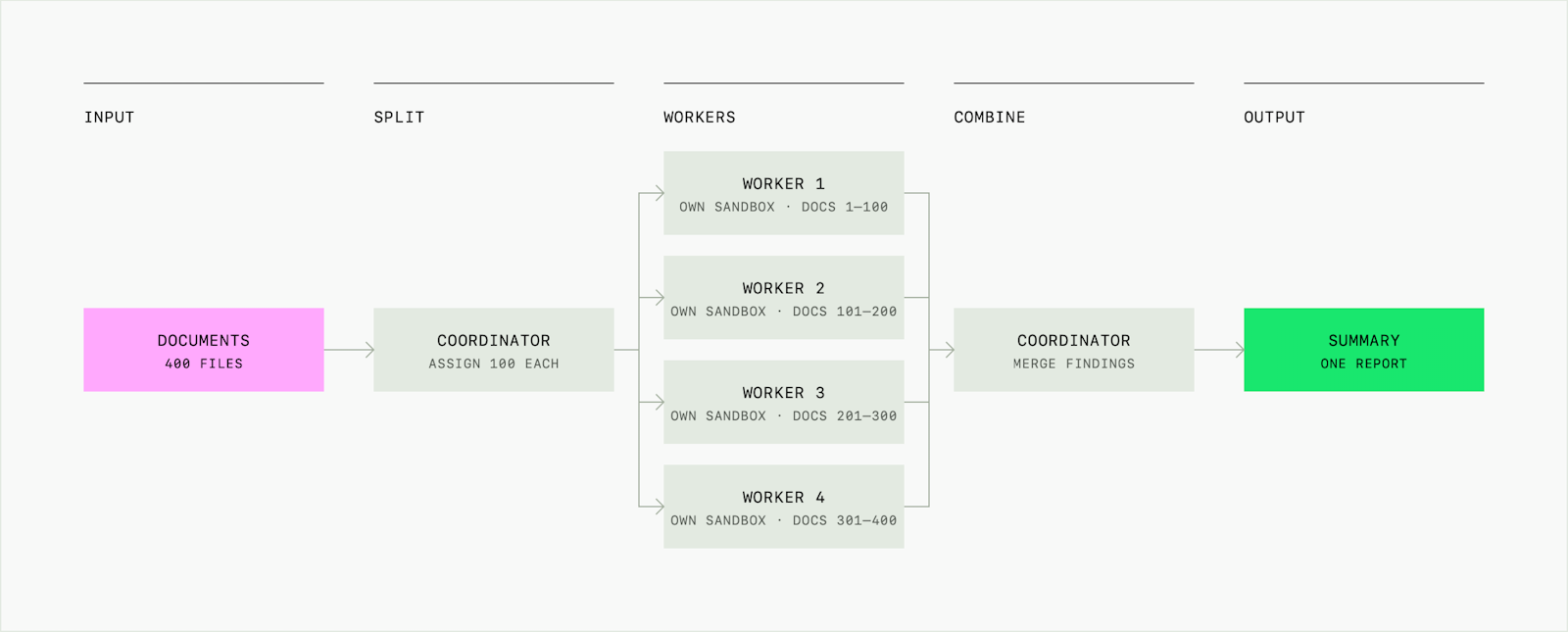
An agent swarm is a group of agents working on different parts of a larger task. An orchestrator assigns work to each agent and combines the results.
For example, to review a large set of documents, an orchestrator can divide the documents among several agents. Each agent works in its own sandbox, analyzes its assigned documents, and returns its findings. The orchestrator then combines the findings into one summary.
The same pattern can be used to analyze datasets or test different parts of a codebase in parallel.
Sharing files with Agent Drive
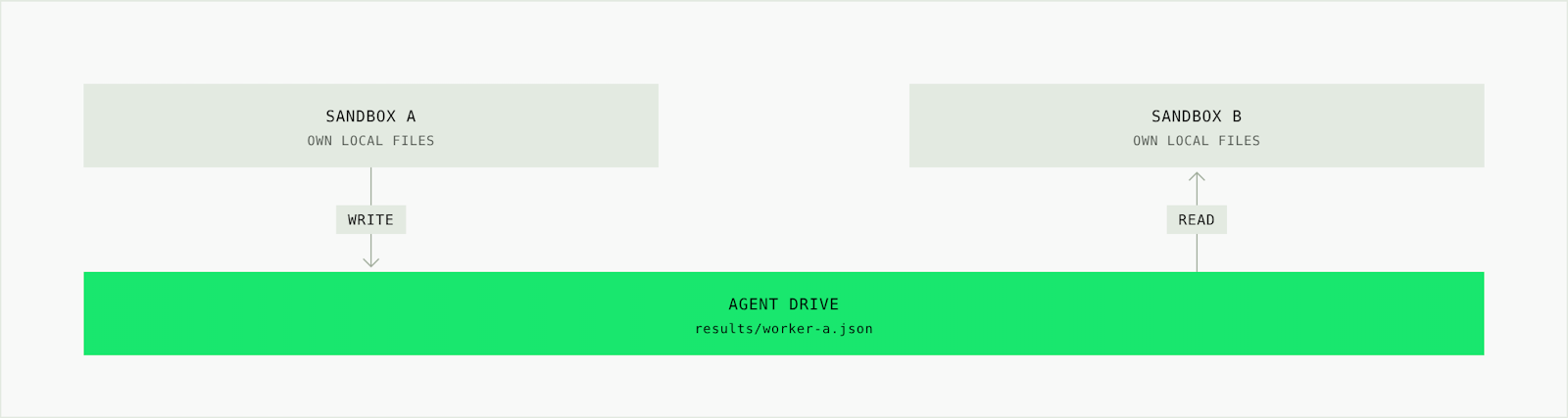
Blaxel’s Agent Drive is a shared filesystem where multiple sandboxes can read and write files. Each agent sees the drive as a regular folder. For example, a coding agent can write its changes to the drive, and a review agent in another sandbox can read them from the same path. Files saved to Agent Drive are still available to authorized sandboxes even after the sandbox that created them is deleted.
Managing API access with Agent Proxy
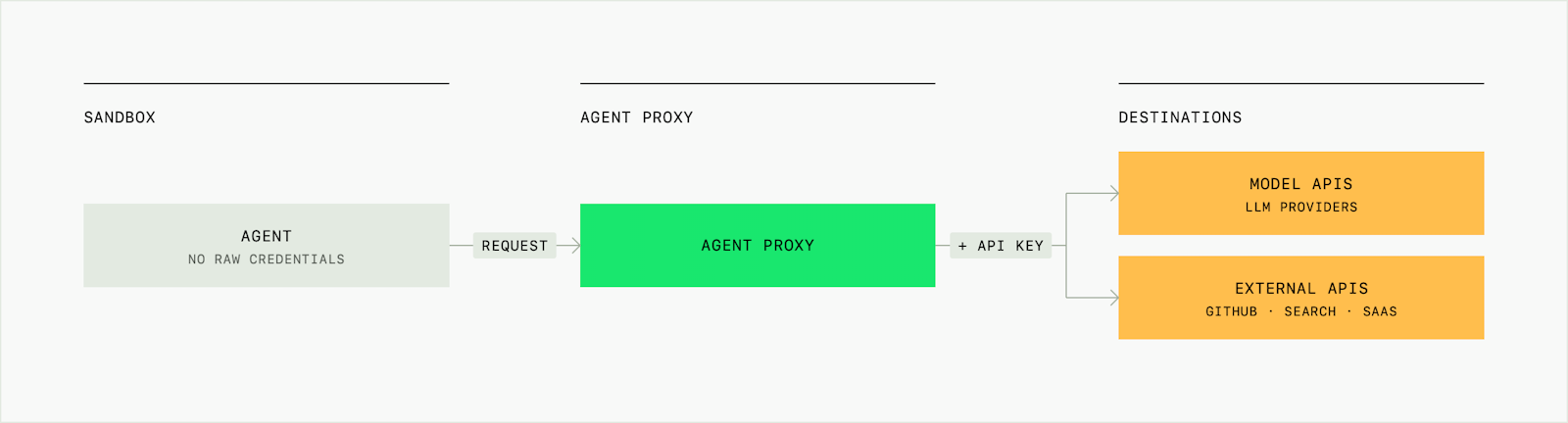
Agents running in sandboxes often need to call APIs (e.g. model APIs, search APIs, GitHub). Blaxel's Agent Proxy sits between the sandbox and those APIs.
The agent sends its request through the proxy. The proxy checks whether the destination is allowed, adds the required credential, and forwards the request. The credential is never exposed to the sandbox. The proxy also logs each request, so you can see which APIs your agents call.
Try agent sandboxes
You can start building with Baseten Sandboxes, and use Blaxel’s Agent Drive and Agent Proxy to share files and manage API access.
FAQ
What is the difference between a sandbox and a container?
A container packages an application and its dependencies, while a sandbox provides an isolated environment for running code. Some sandboxes use containers for isolation, but containers share the server’s kernel, so they’re less isolated than microVMs.
What is a sandbox image?
A sandbox image is a saved setup that every new sandbox starts from. It includes the operating system, programming languages, and any tools or libraries the agent needs. For example, an image for a Python coding agent might include Python, Git, and common packages like NumPy. Without an image, the agent would have to install everything at the start of every task before it could begin working.
Does every agent need its own sandbox?
No. Multiple agents can work in one sandbox, but separate sandboxes give each agent an isolated environment. The right setup depends on whether the agents need to work independently or share an environment.
What happens to files when a sandbox is deleted?
A sandbox’s local files are deleted with it. Save files outside the sandbox if they need to persist. Files stored on Blaxel Agent Drive remain available to authorized sandboxes after the original sandbox is deleted.